Home > Templates
Templates
What are templates ?
Templates are a way to customize how the dropdown lists, autocomplete suggestions, and tree nodes are displayed. With templates, any arbitrary variable returned by the underlying SPARQL datasource can be displayed in a custom HTML template, such as an additional description, birth + death dates of persons, countries of places, etc.
Templates can be used:
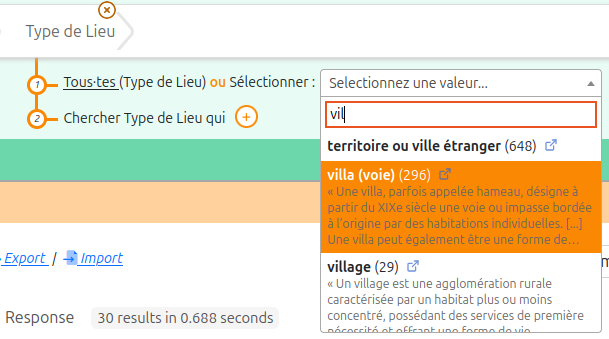
In list widgets:
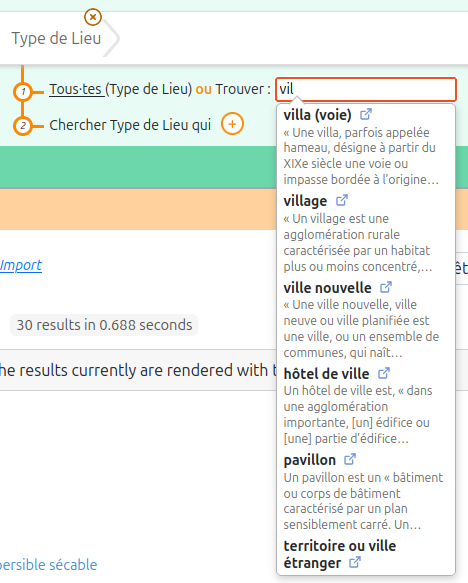
In autocomplete widgets:
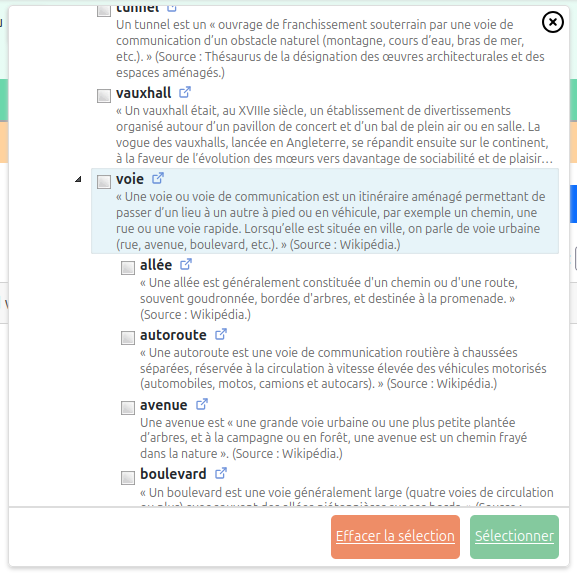
In tree widgets:
How to use templates ?
In order to use templates, you need to do 3 steps:
Step 1 : enrich the SPARQL query of the datasource with extra variables
It is the SPARQL datasource associated to the property in the configuration that is responsible for retrieving the extra information to be displayed in the template. You simply need to return extra columns, with arbitrary names, in addition to the mandatory ones (see the datasource configuration documentation).
Here is an example of a property configured with a datasource that returns an extra description:
@prefix this: <https://data.mydomain.com/ontologies/sparnatural-config/> .

this:Place_type_list sh:path rico:hasOrHadPlaceType;
  sh:name "place type (list)"@en, "type de lieu (liste)"@fr;
  sh:nodeKind sh:IRI;
  sh:node this:PlaceType;
  dash:searchWidget core:ListProperty;
  datasources:datasource this:list_placetype_definition .

this:list_placetype_definition a datasources:SparqlDatasource;
  datasources:noSort "true"^^xsd:boolean ;
  datasources:queryString """
PREFIX rdf: <http://www.w3.org/1999/02/22-rdf-syntax-ns#>
PREFIX skos: <http://www.w3.org/2004/02/skos/core#>
SELECT ?uri ?count ?description (CONCAT(STR(?theLabel), " (", STR(?count), ")") AS ?label) (STR(?theLabel) AS ?itemLabel) WHERE {
  {
    SELECT ?uri ?count ?theLabel WHERE {
      {
        SELECT DISTINCT ?uri (COUNT(?domain) AS ?count) WHERE {
          ?domain rdf:type $domain;
            $property ?uri.
          FILTER(ISIRI(?uri))
        }
        GROUP BY ?uri
      }
      ?uri skos:prefLabel ?theLabel.
      FILTER(((LANG(?theLabel)) = "") || ((LANG(?theLabel)) = $lang))
    }
    ORDER BY DESC (?count) (UCASE(?theLabel))
    LIMIT 500
  }
  OPTIONAL {
    ?uri skos:definition ?description.
    FILTER(((LANG(?description)) = "") || ((LANG(?description)) = $lang))
  }
}
ORDER BY DESC (?count) (UCASE(STR(?label)))
  """;
Step 2 : write your templates
Sparnatural relies on handlebars for writing templates. To write your templates, in line with handlebars recommendations, put them in inner <script type="text/x-handlebars-template"> elements inside the <spar-natural> element, with an id equal to the property shape URI from the config, or equal to the range Node Shape from the config. The widget will look for such a template, based on the property shape id, and use it if it finds one. Otherwise it will apply its default behavior.
The same template can be applicable for a list widget, an autocomplete widget, or a tree widget.
Here is an example for providing a template corresponding to the above property shape (note how the id of the <script> element matches the URI of the property shape):
  <spar-natural (...)>

    <script
      id="https://data.mydomain.com/ontologies/sparnatural-config/Place_type_list"
      type="text/x-handlebars-template"
    >
      <div>
        here will be the template
      </div>
    </script>
  </spar-natural>
To write the content of the template, you design an HTML structure using handlebars, in which variables are inserted. Templates have access to :
- top-level variables :
term: precise value that is returned (URI or literal+lang or literal+datatype)label: display label for the item - can include extr information like “France (38)”itemLabel(optional) : pure label of the value, e.g. “France” for “France (38)”group(optional) : optional group for optgroup in lists
- all the variables of the SPARQL query inside a
bindingsobject.
The variables have the same structure as the SPARQL query result format (so with inner value, xml:lang or datatype fields). So to access the text of the variable ?description from the SPARQL, you would write ``.
Here is a full example:
  <spar-natural (...)>

    <script
      id="https://data.mydomain.com/ontologies/sparnatural-config/Place_type_list"
      type="text/x-handlebars-template"
    >
        <div class="custom-item-template">
          <b></b>
            <span
              class="custom-item-count"
            >()</span>
          <a
            class="custom-item-link"
            href=""
            target="_blank"
            rel="noopener"
            title=""
          ></a>
          <br /><small
            ></small>
        </div>
    </script>
  </spar-natural>
The template displays the label from the datasource, the count if available, an external clickable link to the URI, and below, inside a <small> element, a description, if available.
Step 3 : apply custom CSS rules (optional)
The templates you write may contain arbitrary HTML code, including arbitrary CSS classes, on which you can then apply custom CSS rules.
Here is a full set of CSS classes to provide clickable URI in lists, autocomplete, and tree, that works with the template above:
        <style>
          /* La description doit revenir a la ligne dans la largeur disponible,
                 et non etendre la liste ou deborder du panneau. */
          .custom-item-template {
            max-width: 100%;
            white-space: normal;
            overflow-wrap: anywhere;
          }
          .custom-item-template small {
            display: -webkit-box;
            -webkit-line-clamp: 4;
            line-clamp: 4;
            -webkit-box-orient: vertical;
            overflow: hidden;
            color: #666;
            line-height: 1.3;
          }

          /* Le lien du template, avec sa propre classe : la page ne depend pas des regles
             de Sparnatural. Masque tant que la ligne n'est pas survolee, opacity et non
             display pour que la place reste reservee et que le libelle ne se decale pas. */
          .custom-item-link {
            display: inline-block;
            width: 12px;
            height: 12px;
            margin-left: 0.35em;
            vertical-align: baseline;
            text-decoration: none;
            cursor: pointer;
            opacity: 0;
            transition: opacity 0.12s;
            background: url("data:image/svg+xml,%3Csvg xmlns='http://www.w3.org/2000/svg' viewBox='0 0 12 12'%3E%3Cg fill='none' stroke='%2336c' stroke-width='1.3' stroke-linecap='round' stroke-linejoin='round'%3E%3Cpath d='M8.6 6.9v3.3a.8.8 0 0 1-.8.8H1.8a.8.8 0 0 1-.8-.8V4.2a.8.8 0 0 1 .8-.8h3.3'/%3E%3Cpath d='M7.4 1H11v3.6'/%3E%3Cpath d='M11 1 5.4 6.6'/%3E%3C/g%3E%3C/svg%3E") center / 12px 12px no-repeat;
          }
          /* Le :hover couvre la souris, les deux autres classes la ligne mise en avant au
             clavier. Selecteurs globaux : select2 deplace sa liste deroulante dans le body. */
          .select2-results__option:hover .custom-item-link,
          .select2-results__option--highlighted .custom-item-link,
          .awesomplete > ul > li:hover .custom-item-link,
          .awesomplete > ul > li[aria-selected="true"] .custom-item-link,
          .jstree-anchor:hover .custom-item-link,
          .jstree-hovered .custom-item-link {
            opacity: 0.7;
          }
          /* meme specificite que le bloc ci-dessus : c'est l'ordre qui tranche, garder en dernier */
          .select2-results__option .custom-item-link:hover,
          .awesomplete > ul > li .custom-item-link:hover,
          .jstree-anchor .custom-item-link:hover {
            opacity: 1;
          }

          /* Dans l'arbre, le template occupe plusieurs lignes, alors que jstree impose
             24px de hauteur et interdit le retour a la ligne. */
          .tree-widget .treeLayer .treeDisplay:has(.custom-item-template) {
            /* 275px par defaut, trop etroit des qu'il y a une description */
            min-width: 560px;
          }
          .treeDisplay .jstree-anchor:has(.custom-item-template) {
            display: inline-flex;
            align-items: flex-start;
            white-space: normal;
            height: auto;
            line-height: 1.3;
            padding-block: 2px;
            /* 24px = la fleche de depliage, qui partage la ligne avec l'ancre */
            max-width: calc(100% - 24px);

            & > .jstree-icon {
              flex: none;
            }
            & .custom-item-template {
              flex: 1;
              min-width: 0;
            }
          }

          /* Awesomplete s'elargit au contenu et refuse le retour a la ligne */
          .awesomplete > ul {
            max-width: 34em;
          }
          .awesomplete > ul > li {
            white-space: normal;
          }
        </style>
The default template
In order to overwrite the default template used by Sparnatural, use a template with the id default-template:
        <spar-natural

        >
          <!-- default template -->
          <script id="default-template" type="text/x-handlebars-template">
            <span>}</span>
          </script>
        <spar-natural>
This can be useful if you don’t want Sparnatural to propose a navigation link to the URI from the lists / autocomplete or trees.
Template examples
Label + link + description
  <spar-natural>

      <script
        id="https://data.mydomain.com/ontologies/sparnatural-config/Place_type_autocomplete"
        type="text/x-handlebars-template"
      >
        <div class="custom-item-template">
          <b></b>
          <a
            class="custom-item-link"
            href=""
            target="_blank"
            rel="noopener"
            title=""
          ></a>
          <br /><small
            ></small>
        </div>
      </script>

  </spar-natural>
Label + count + link + description
  <spar-natural>
    <script
      id="https://data.mydomain.com/ontologies/sparnatural-config/Place_type_list"
      type="text/x-handlebars-template"
    >
      <div class="custom-item-template">
        <b></b>
          <span
            class="custom-item-count"
          >()</span>
        <a
          class="custom-item-link"
          href=""
          target="_blank"
          rel="noopener"
          title=""
        ></a>
        <br /><small
          ></small>
      </div>
    </script>
  </spar-natural>
Label + description (in a tree)
  <spar-natural>

    <script
      id="https://data.mydomain.com/ontologies/sparnatural-config/Place_type_list"
      type="text/x-handlebars-template"
    >
      <div class="custom-item-template">
        <b></b>
        <span
          class="custom-item-link"
          data-href=""
          title=""
        ></span>
        <br /><small
          ></small>
      </div>
    </script>

  </spar-natural>