Home > Datasources
Datasources
Datasources basics
Lists and autocomplete properties in Sparnatural can be associated to a datasources:datasource annotation to populate respectively the list of values or the values proposed by autocompletion. Tree properties can also be associated to 2 datasources to populate respectively the roots of the tree, and the children of a node.
In its simplest and most common form a datasource is a SPARQL query that returns the expected columns to be used to populate the list/autocomplete values.
The datasources:datasource annotation is placed on the corresponding property shape in the SHACL configuration.
The value of this annotation can be either:
- The URI pre-configured datasource that is shipped with Sparnatural;
- The URI of a pre-configured SPARQL query, plus a property URI to be injected in this query;
- The URI of your own custom datasource;
These 3 solutions are described below.
Preconfigured datasources
Preconfigured datasources for a ListProperty
Sparnatural comes preconfigured with datasources that can populate lists based on rdfs:label, skos:prefLabel, foaf:name, dcterms:title, schema:name or the URI of the entity. For each of these properties, 3 flavors of datasource exist :
- an alphabetical ordering
- an alphabetical ordering plus the count shown in parenthesis
- a descending count ordering.
Use one of these datasources if your RDF data relies on one of these properties.
The preconfigured datasource identifiers for a ListProperty are :
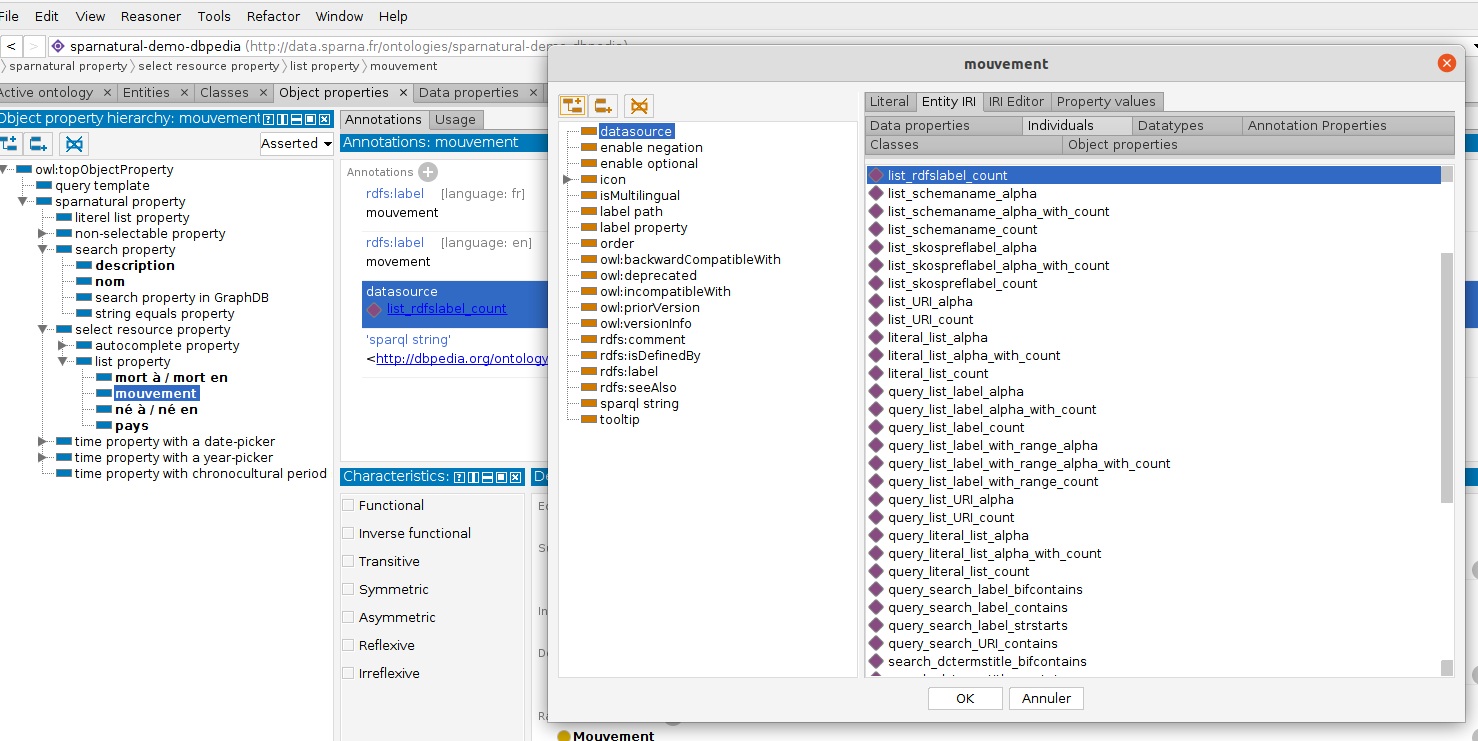
datasources:list_URI_or_literal_alphaanddatasources:list_URI_or_literal_alpha_with_countanddatasources:list_URI_or_literal_countdatasources:list_URI_alphaanddatasources:list_URI_countdatasources:list_rdfslabel_alphaanddatasources:list_rdfslabel_countanddatasources:list_rdfslabel_alpha_with_countdatasources:list_skospreflabel_alphaanddatasources:list_skospreflabel_countanddatasources:list_skospreflabel_alpha_with_countdatasources:list_foafname_alphaanddatasources:list_foafname_countanddatasources:list_foafname_alpha_with_countdatasources:list_dctermstitle_alphaanddatasources:list_dctermstitle_countanddatasources:list_dctermstitle_alpha_with_countdatasources:list_schemaname_alphaanddatasources:list_schemaname_countanddatasources:list_schemaname_alpha_with_count
You can find these identifiers in the Sparnatural datasource ontology documentation, that you can open in Protégé, under the tabs “Entity IRI”, then “Individuals” :
A note on the range criteria in default list datasources
The provided default datasources to populate the lists do not use the range of the value as a criteria in the query. In other words, all the values of the given property in the given domain are returned, whatever their type.
This is usually sufficient and more performant but this can be a problem if the same property in the same domain can refer to entities of different type in the Sparnatural configuration. For example consider the situation where “the creator of a Document can be either a Person or an Organization”. When listing the values of possible creators of documents, both Persons and Organization will be mixed in the same list.
To use the range as a criteria in the query and filter the list based on the type of the value, you need to create a custom datasource based on one of the predefined query template having a “..._with_range_...” in its identifier. This will garantee that only values of the selected type will appear in the list. See below on how to create a custom datasource based on a predefined query template including the range criteria.
Preconfigured datasources for an AutocompleteProperty
Sparnatural comes preconfigured with datasources that can populate autocomplete fields based on rdfs:label, skos:prefLabel, foaf:name, dcterms:title, schema:name or the URI of the entity. For each of these properties, 3 flavors of datasource exist : either searching by the beginning of the value with strstarts(), anywhere in the value with contains() or using Virtuoso-specific bif:contains() function. Additionally, a search datasource can search on the URI using the contains() function.
The preconfigured datasource identifiers for an AutocompleteProperty are :
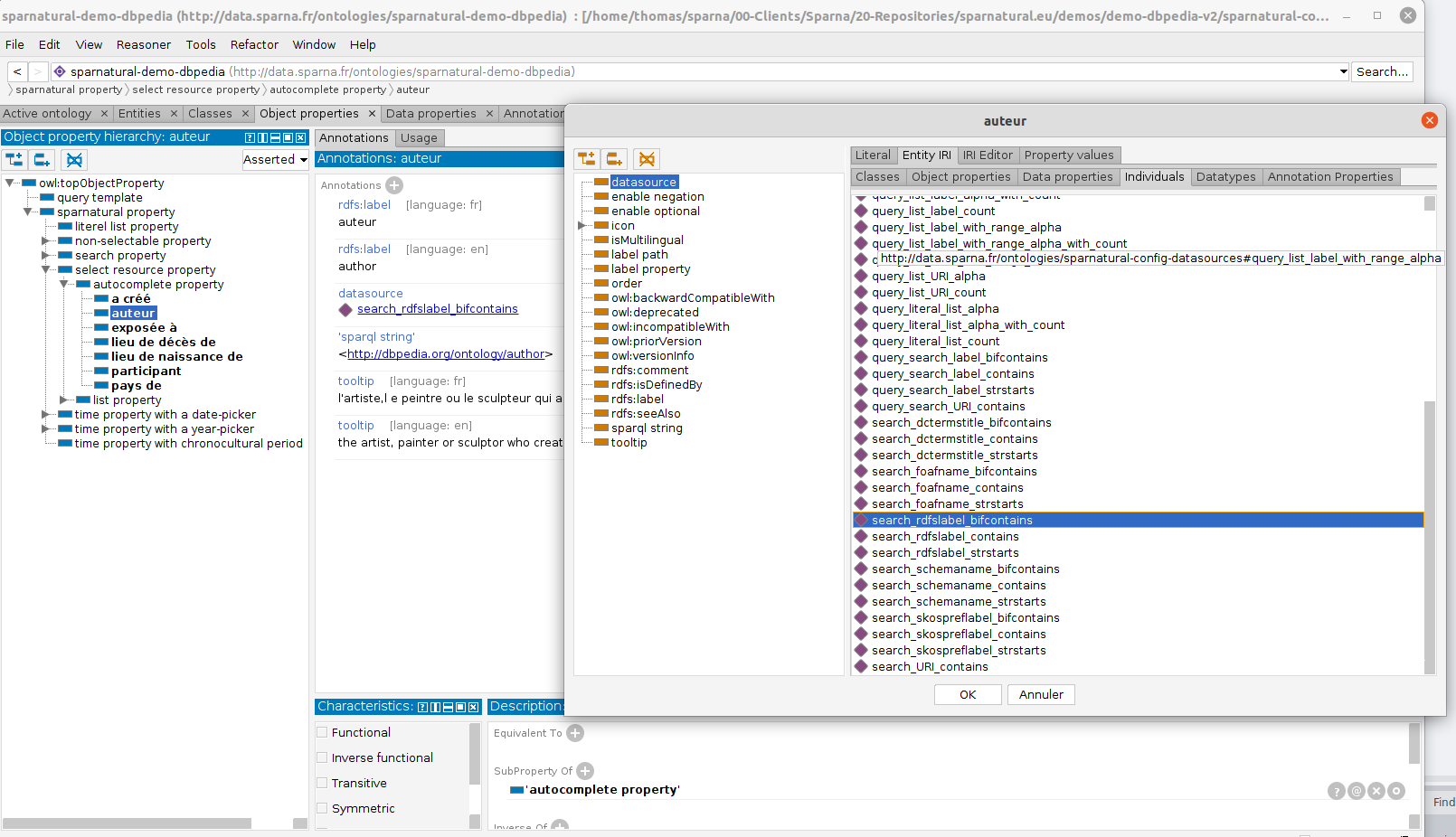
datasources:search_URI_containsdatasources:search_rdfslabel_strstartsdatasources:search_rdfslabel_containsdatasources:search_rdfslabel_bifcontainsdatasources:search_foafname_strstartsdatasources:search_foafname_containsdatasources:search_foafname_bifcontainsdatasources:search_dctermstitle_strstartsdatasources:search_dctermstitle_containsdatasources:search_dctermstitle_bifcontainsdatasources:search_skospreflabel_strstartsdatasources:search_skospreflabel_containsdatasources:search_skospreflabel_bifcontainsdatasources:search_schemaname_strstartsdatasources:search_schemaname_containsdatasources:search_schemaname_bifcontains
Similarly to list datasources, you find these under the “Entity IRI” > “Individuals” tab of Protégé when you open the Sparnatural datasource ontology in Protégé :
Preconfigured SPARQL query with another property
How-to create your own datasource with an existing SPARQL query but using another property
If the preconfigured datasources do not fit the data model to be queried, you have the ability to refer to the same SPARQL queries used by these datasources, but adjust the property to be searched or used as a label. To do so, you need to create a new instance of type datasources:SparqlDatasource, and provide 2 information:
-
a
datasources:queryTemplateproperty to one of the preconfigured SPARQL query template that are bundled with Sparnatural. - For property shapes using
core:TreePropertyas theirdash:searchWidget, and returning URIs (the most common case) this can be:datasources:query_list_label_alphadatasources:query_list_label_countdatasources:query_list_label_alpha_with_countdatasources:query_list_label_with_range_alpha: to be used if you need the range to be part of the query - alphabetical ordering variantdatasources:query_list_label_with_range_count: to be used if you need the range to be part of the query - descending count ordering variantdatasources:query_list_label_with_range_alpha_with_count: to be used if you need the range to be part of the query - alphabetical ordering variant with count in parenthesis variant
- For property shapes using
core:TreePropertyas theirdash:searchWidget, but returning literal values, this can be: 1.datasources:query_literal_list_alpha(literals ordered alphabetically) 1.datasources:query_literal_list_count(literals ordered by descending count) 1.datasources:query_literal_list_alpha_with_count(literals ordered alphabetically with the count in parenthesis) - For property shapes using
core:TreePropertyas theirdash:searchWidget, in the rare edge case where the value can be sometimes a literal value, sometimes a URI with a label property: 1.datasources:query_list_URI_or_literal_alpha- values ordered alphabetically 1.datasources:query_list_URI_or_literal_alpha_with_count- values ordered alphabetically with count in parenthesis 1.datasources:query_list_URI_or_literal_count- values ordered by descending count - For property shapes using
core:AutocompletePropertyas theirdash:searchWidget, this can be:datasources:query_search_label_strstarts: search usingSTRSTARTSSPARQL functiondatasources:query_search_label_contains: search usingCONTAINSSPARQL functiondatasources:query_search_label_bifcontains: search usingbif:containsVirtuoso-specific SPARQL functiondatasources:query_search_URI_contains: : search usingCONTAINSSPARQL function inside the URIdatasources:query_search_literal_strstarts: : search inside the value as a literal, not a URI, using SPARQLSTRSTARTSfunctiondatasources:query_search_literal_contains: : search inside the value as a literal, not a URI, using SPARQLCONTAINSfunction
- And one of those 2 properties:
datasources:labelPropertywith the IRI of property that corresponds to the label to be retrieved or searched, in replacement, and playing the same role, as one of the 5 default properties of Sparnatural (rdfs:label,skos:prefLabel,foaf:name,dcterms:title,schema:name)datasources:labelPathwith the SPARQL property path to use (using angle brackets, no prefixes) to fetch the label of entities. In particular this allows to deal with situations where the labels are reified as separate entities.
For example to create a new custom datasource that will use dc:title as the label, and use an alphabetical ordering, the corresponding SHACL configuration will be the following:
exconfig:myPropertyShape
  sh:path ex:myProperty ;
  sh:name "my property" ;
  sh:node exconfig:Document ;
  # this will be a dropdown list
  dash:searchWidget datasources:ListProperty ;
  # use this custom datasource to populate the dropdown list
  datasources:datasource exconfig:myCustomDatasource ;

# The custom datasource
exconfig:myCustomDatasource a datasources:SparqlDatasource ;
  # use this SPARQL query template...
  datasources:queryTemplate datasources:query_list_label_alpha;
  # ... with this property as the display label to be fetched
  datasources:labelProperty dc:title .
Your own SPARQL query (lists / autocomplete)
Configuring your own SPARQL query
You can provide your own SPARQL queries to populate lists or autocomplete suggestions. To do so, attach a datasources:queryString annotation on your datasource object, holding the SPARQL query that should be used to populate the list/autocomplete.
The SPARQL query MUST return 2 variables : ?uri and ?label, populated anyway you like.
Additionally, the query can return, optionally:
- an extra
?groupvariable, which will be used to generateoptgroupsections in lists widgets, and will be used as hover tooltips in autocompletion lists. This is used to indicate the source endpoint of the result in cases of multiple endpoints. - an extra
?itemLabelvariable, which will be used, if present, as the label of the selected value; for exemple,?labelcan hold a count, like “Italy (307)”, while?itemLabelcan be just “Italy”.
In this SPARQL query, you can use the following placeholders that will be replaced automatically by Sparnatural before executing the query:
$domain, if present, will be replaced by the URI of the domain node shape (the one pointing to the property shape withsh:property);$range, if present, will be replaced by the URI of the range node shape (the one indicated insh:node, or having the samesh:targetClassas the one indicated insh:classon the property shape);$property, if present, will be replaced by the URI of the property shape;$lang, if present, will be replaced by thelangparameter of Sparnatural;$defaultLang, if present, will be replaced by thedefaultLangparameter of Sparnatural;$type, if present, will be replaced by thetypePredicateparameter value of Sparnatural config (useful if you query a wikibase endpoint where the type predicate is something else than rdf:type);$key, if present, will be replaced by the searched key (only useful for autocomplete fields);
Take a look at the preconfigured SPARQL queries in the Sparnatural datasources ontology to get you started.
Here is an example of such a query: (note the use of the placeholder variables that will be replaced with the corresponding values):
SELECT ?uri ?count (CONCAT(STR(?theLabel), ' (', STR(?count), ')') AS ?label) (STR(?theLabel) AS ?itemLabel)
WHERE {
  {
    SELECT DISTINCT ?uri (COUNT(?domain) AS ?count)
    WHERE {
      ?domain a $domain .
      ?domain $property ?uri .
      FILTER(isIRI(?uri))
      # Note how the $range criteria is not used in this query
    }
    GROUP BY ?uri
   }
   ?uri $labelPath ?theLabel .
   FILTER(lang(?theLabel) = "" || lang(?theLabel) = $lang)
}
ORDER BY UCASE(?label)
LIMIT 500
Here is a SHACL configuration example:
exconfig:myPropertyShape
  sh:path ex:myProperty ;
  sh:name "my property" ;
  sh:node exconfig:Document ;
  # this will be a dropdown list
  dash:searchWidget datasources:ListProperty ;
  # use this custom datasource to populate the dropdown list
  datasources:datasource exconfig:myCustomDatasource ;

# The custom datasource
exconfig:myCustomDatasource a datasources:SparqlDatasource ;
  # use this SPARQL query to populate the dropdown
  datasources:queryString """
    SELECT ?uri ?count WHERE { etc... }
  """
.
Node Shapes and Property Shapes URI will be expanded to their target and predicate
You should remember that the final SPARQL query that will be executed will be preprocessed so that:
- Property shapes URI replaced in the
$propertyplaceholder will be expanded to their correspondingsh:path - Node shapes URI replaced in the
$domainand$rangeplaceholder will be expanded to their correspondingsh:targetClassor their correspondingsh:target/sh:selectSPARQL query.
Configuring your own SPARQL query to return literal values
You can populate dropdown lists with literal values. In this case The SPARQL query MUST return 2 variables : ?value and ?label, populated anyway you like. The ?value variable should hold the literal value to be used in the final SPARQL query, and ?label should hold what is visually displayed in the dropdown. Both variables can be the same, but not necessarily, e.g. if the ?label should hold a count in parenthesis, while the ?value holds the actual literal value. Take a look at the predefined query_literal_list_alpha query:
SELECT DISTINCT ?value (STR(?value) AS ?label)
WHERE {
    ?domain $type $domain .
    ?domain $property ?value .
}
ORDER BY UCASE(STR(?label))
LIMIT 500
Datasources for core:TreeProperty
Preconfigured datasources for a TreeProperty
Sparnatural comes preconfigured with datasources that can populate a tree selector with the roots and the children of each node.
Preconfigured datasources for the roots of a TreeProperty
These datasources are to be used with a datasources:treeRootsDatasource annotation on a property shape using a core:TreeProperty widget.
The preconfigured datasource identifiers for roots datasource on a TreeProperty are :
datasources:tree_root_skostopconcept: reads the roots of a SKOS ConceptScheme usingskos:hasTopConceptor^skos:topConceptOf, assuming the URI of the Sparnatural entity in the config is equal to the URI of the ConceptSchemedatasources:tree_root_skostopconcept_with_count: same as previous, but returns the number of occurences of each node in parenthesis
Preconfigured datasources for the children of a TreeProperty
These datasources are to be used with a datasources:treeChildrenDatasource annotation on a property shape using a core:TreeProperty widget.
The preconfigured datasource identifiers for children datasource on a TreeProperty are :
datasources:tree_children_skosnarrower: reads the children of a node usingskos:narroweror^skos:broaderdatasources:tree_children_skosnarrower_with_count: same as previous, but returns the number of occurences of each node in parenthesis
Tree widget example configuration
# Property using a tree widget
shape:SpecialitePharmaceutique_classificationATC sh:path ex:atcClassification;
  sh:name "ATC classification"@en;
  sh:nodeKind sh:IRI;
  sh:node shape:ATC;
  # This is a tree property
  dash:searchWidget config-core:TreeProperty;
  # roots datasource
  config-datasources:treeRootsDatasource shape:tree_atc_root;
  # children datasource
  config-datasources:treeChildrenDatasource shape:tree_atc_child .


# Datasource to populate the roots
shape:tree_atc_root a config-datasources:SparqlDatasource;
  config-datasources:queryString """PREFIX rdfs: <http://www.w3.org/2000/01/rdf-schema#>
PREFIX skos: <http://www.w3.org/2004/02/skos/core#>
SELECT ?uri (CONCAT(?code, \" - \", STR(?rdfs_label)) AS ?label) (COUNT(?x) AS ?count)
WHERE {
 ?uri rdfs:subClassOf <http://data.esante.gouv.fr/whocc/atc/ATC> .
 ?uri rdfs:label ?rdfs_label .
 ?uri skos:notation ?code .
 FILTER(lang(?rdfs_label) = $lang)

 # Counts how many time the URI is used as value in the criteria build in Sparnatural
 OPTIONAL {
 ?x $property ?uri .
 }
}
GROUP BY ?uri ?code ?rdfs_label
ORDER BY ?label""" .

# Datasource to populate the children of a node, when clicked
shape:tree_atc_child a config-datasources:SparqlDatasource;
  config-datasources:queryString """PREFIX rdfs: <http://www.w3.org/2000/01/rdf-schema#>
PREFIX skos: <http://www.w3.org/2004/02/skos/core#>
SELECT ?uri (CONCAT(?code, \" - \", STR(?rdfs_label)) AS ?label) ?hasChildren (COUNT(?x) AS ?count)
WHERE {
 # The $node variable will be replaced by the URI of the node being expanded in the tree
 ?uri rdfs:subClassOf $node .
 ?uri rdfs:label ?rdfs_label .
 ?uri skos:notation ?code .
 FILTER(lang(?rdfs_label) = $lang)

 # if nodes have themselves children, they will be expandable in the tree, otherwise not
 OPTIONAL { ?something rdfs:subClassOf ?uri }
 BIND(bound(?something) AS ?hasChildren)

 # Counts how many time the URI is used as value in the criteria build in Sparnatural
 OPTIONAL {
 ?x $property ?uri .
 }

}
GROUP BY ?uri ?code ?rdfs_label ?hasChildren
ORDER BY ?label""" .
Your own SPARQL queries for a Tree widget
You can provide your own SPARQL queries to populate a tree widget. To do so, you need 2 datasources : one that will populate the roots of the tree (entries at first level), and one that will be used to populate the children of a tree, when clicked (see the annotations for a SelectResourceProperty for more information).
The SPARQL query MUST return 2 variables : ?uri and ?label, populated anyway you like.
The SPARQL query CAN return 2 other variables :
?hasChildren, a boolean to indicate if the node has children. If not present, all tree items can be unfolded, even when have no children; if present and set to false, an item cannot be unfolded.?countto indicate the number of times a node is used as a value; nodes with a count = 0 will be disabled and cannot be selected as a value.
In these SPARQL query, the same replacement of the $domain, $range, $property, etc. than in the queries for list/autocomplete will happen (see above). The following additional replacements will happen:
$node, if present, will be replaced by the URI of the node being clicked;
A typical query that populates the ?hasChildren and ?count variable looks like the following :
PREFIX skos: <http://www.w3.org/2004/02/skos/core#>
SELECT DISTINCT ?uri (CONCAT(STR(?theLabel), ' (', STR(?count), ')') AS ?label) ?hasChildren (COUNT(?x) AS ?count)
WHERE {

  {
    SELECT ?uri ?theLabel ?hasChildren
    WHERE {
      # Note the $node variable that can is replaced by the URI of the node being clicked
      $node skos:narrower|^skos:broader ?uri .
      ?uri skos:prefLabel ?theLabel .
      FILTER(isIRI(?uri))
      FILTER(lang(?theLabel) = '' || lang(?theLabel) = $lang)
      # tests if the URI itself has some children to populate ?hasChildren
      OPTIONAL {
        ?uri skos:narrower|^skos:broader ?children .
      }
      BIND(IF(bound(?children),true,false) AS ?hasChildren)
    }
  }

  # Counts how many time the URI is used as value in the criteria build in Sparnatural
  OPTIONAL {
    ?x a $domain .
    ?x $property ?uri .
    # here we choose not to use the $range criteria, but it can also be used
    # ?uri a $range .
  }
}
GROUP BY ?uri ?theLabel ?hasChildren
ORDER BY UCASE(?label)
Datasource configuration reference
| Annotation / Axiom | Label | Card. | Description |
|---|---|---|---|
queryString |
query string | 0..1 | The SPARQL query string of the datasource. At least one of queryTemplate or queryString must be provided. |
queryTemplate |
query template | 0..1 | The SPARQL query template to be used in a SPARQL datasource. At least one of queryTemplate or queryString must be provided. |
labelProperty |
label property | 0..1 | Used in combination with queryTemplate, indicates the URI of the property that will replace the variable $labelPath in the SPARQL query. |
labelPath |
label path | 0..1 | Used in combination with queryTemplate indicate a SPARQL property path that will replace the variable $labelPath in the SPARQL query. |
noSort |
no sort | 0..1 | By default Sparnatural sorts the list using the locale of the client. Set this to true if you don’t want that sorting to happen and want to rely on the sort order returned by the SPARQL query. |